

Understanding Connectors and Their Importance
Connectors play a key role in electrical systems. They allow you to join wires and create circuits safely and reliably. Let’s explore the basics of these important components.
Basics of Electrical Connectors
Electrical connectors join wires and create paths for electricity to flow. They come in many shapes and sizes to fit different needs. Some common types include:
- Pin and socket connectors
- Blade connectors
- Ring and spade terminals
- Banana plugs
Connectors protect the wire ends and make it easy to disconnect and reconnect parts of a circuit. This helps with repairs and upgrades. Good connectors also prevent loose connections that could cause sparks or fires.
Connector Gender and Contacts
Connectors have male and female parts that fit together. The male part has pins or blades that stick out. The female part has sockets or holes that the male part fits into.
Contacts are the metal parts inside connectors that touch to make the electrical connection. They’re often made of copper or brass. Some contacts are plated with gold or tin to resist corrosion.
The number of contacts in a connector can range from just two up to hundreds for complex electronics. More contacts allow more separate circuits to connect through one plug.
Common Materials and Insulation
Connector bodies are usually made of plastic or metal. Plastic is cheap and doesn’t conduct electricity. Metal is stronger but needs insulation to be safe.
Common plastics used include:
- Nylon
- PVC
- Polyethylene
Insulation keeps the electrical parts from touching things they shouldn’t. It prevents short circuits and shocks. Some connectors use rubber or silicone for a tight seal against water and dust.
Insulation displacement connectors (IDC) are special. They cut through wire insulation to make contact. This makes them quick to use but they only work once.
Connector Types and Usage
Connectors let you link devices and transfer data or power. Different types work for specific needs. Let’s look at some common connector types and what they’re used for.
USB Connectors
USB connectors are everywhere. You use them to charge phones and connect gadgets to computers.
USB-A is the classic flat, rectangular plug. It’s on one end of most USB cables. You’ll find it on computers, TVs, and game consoles.
USB-C is newer and smaller. It’s oval and works both ways up. Many phones and laptops now use USB-C. It can carry more power and data than USB-A.
There are also Mini-USB and Micro-USB. These are smaller and often found on older devices like cameras or GPS units.
Video and Display Connectors
These connectors send video signals from computers or media players to screens.
HDMI is very common. It carries high-quality digital video and audio. You use it to connect TVs, monitors, and game systems.
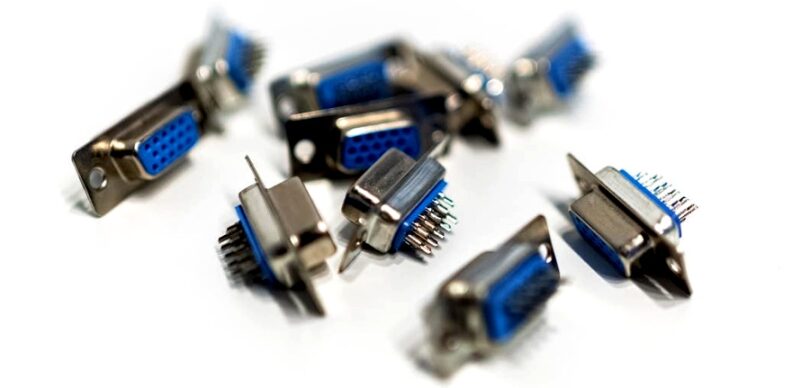
VGA is an older type with a blue plug and 15 pins. It only does video, not audio. You might still see it on some projectors or older computers.
DVI looks like a bigger version of VGA. It can do digital or analog video. It’s less common now but still on some monitors.
DisplayPort is newer. It’s similar to HDMI but can handle even higher resolutions. You often find it on gaming monitors.
Audio and Telecommunications Connectors
These connectors deal with sound and phone signals.
The 3.5mm audio jack is super common. You use it for headphones and speakers. It has a small, round plug.
RCA connectors have red and white plugs for stereo sound. You might use them to hook up home theater systems.
Phone jacks connect landline phones. They’re getting less common as more people use cell phones.
S/PDIF is for digital audio. It can be either an optical or coaxial connector. You might use it to link a TV to a sound system.
Physical Characteristics of Connectors
Connectors come in many shapes and sizes to fit different needs. Let’s look at some key features that make each type unique and useful for specific jobs.
Size and Shape Considerations
Connector size and shape are super important. They affect how well a connector fits and works. Some connectors are tiny, like those in your phone. Others are big, like the ones in power tools.
Round connectors are common. They’re great for things that twist to lock in place. Square or rectangular ones often have lots of pins for data transfer.
The contact pitch matters too. It’s how far apart the pins are. A smaller pitch means more pins can fit in a tiny space. This is neat for gadgets that need to be small but do a lot.
Mount Types and Board Connections
How a connector attaches to a circuit board is key. Some snap right onto the board. These are called board-to-board connectors. They’re great for stacking boards in tight spaces.
Through-hole mounts have pins that go through holes in the board. They’re strong and good for things that might get bumped around.
Surface-mount connectors sit on top of the board. They’re easier to put on with machines. This makes them cheaper for making lots of gadgets.
Some connectors can be plugged in and unplugged easily. Others are meant to stay put once they’re installed.
Cable Types and Gauge
The kind of cable a connector uses matters a lot. Some are for thin wires, others for thick ones. Wire size is measured by gauge. A lower number means a thicker wire.
Ribbon cables are flat and have lots of wires side by side. They’re great for connecting many things at once.
Coaxial cables have a special shape that’s good for TV and internet signals. They keep the signal strong over long distances.
Some connectors work with fiber optic cables. These use light to send data super fast. They’re perfect for the internet and phone networks.
Connector Performance Factors
Choosing the right connector involves looking at several key factors. These include electrical specs, how long it lasts, and how well it stands up to different environments.
Electrical Specifications
Current and voltage ratings are crucial for connectors. You need to pick ones that can handle the power your system needs. The pitch, or space between contacts, matters too. Smaller pitch allows for more pins in less space.
Connectors also have different signal types. Some work best for power, while others are made for data or radio signals. Make sure to match the connector to your signal needs.
Signal integrity is important for data connectors. You want minimal interference and signal loss.
Durability and Mating Cycles
Mating cycles tell you how many times you can plug and unplug a connector. Some can handle thousands of cycles, while others are meant for just a few.
The materials used affect durability. Gold-plated contacts resist wear better than tin ones.
Strain relief is key for cable connectors. It stops the wires from breaking where they enter the connector.
Look for connectors with solid locking mechanisms. This keeps them from coming loose due to vibration.
Environmental Considerations
Connectors face different challenges based on where they’re used. Some need to be waterproof or resist heat.
IP ratings show how well a connector keeps out dust and moisture. Higher numbers mean better protection.
For outdoor use, UV resistance is important. It stops the plastic from breaking down in sunlight.
Some connectors have special seals to keep out dirt and water. This is vital for automotive or marine applications.
Temperature range is another factor. Make sure the connector can handle both hot and cold extremes in its intended use.
Connector Assembly and Tools
Putting connectors together the right way is key. You’ll need some special tools to do it well. Let’s look at how to assemble connectors and what you’ll need in your toolbox.
Crimping and Assembly Techniques
Crimping is a big part of connector assembly. It joins wires to connector pins. To crimp, you strip the wire end and put it in the connector’s metal part. Then you use a tool to squeeze it tight.
Good crimping makes strong connections. Bad crimps can cause problems later. Take your time and practice to get it right.
Some connectors snap together. Others need screws or special tools. Always check the instructions. They’ll tell you the right way to put the pieces together.
Clean work areas help too. Dust or dirt can mess up connections. Keep your space tidy for the best results.
Essential Tools for Connector Fitting
You’ll want some basic tools to work with connectors:
- Wire strippers
- Crimping tools
- Screwdrivers (flathead and Phillips)
- Pliers
- Multimeter
Crimping tools are super important. They come in different sizes for various connectors. Make sure you have the right one for your job.
Wire strippers help remove insulation without damaging the wire. Good ones can handle many wire sizes.
A multimeter checks your work. It makes sure connections are good and there are no shorts.
Don’t forget safety gear! Wear safety glasses to protect your eyes. Gloves can help too, especially with small parts.
Photo by IT services EU.